A planner that shows your Google or Apple calendar
The Planner is a month view for events, birthdays and anything that repeats. It can also show your Google, Apple or Outlook calendar in the same place.
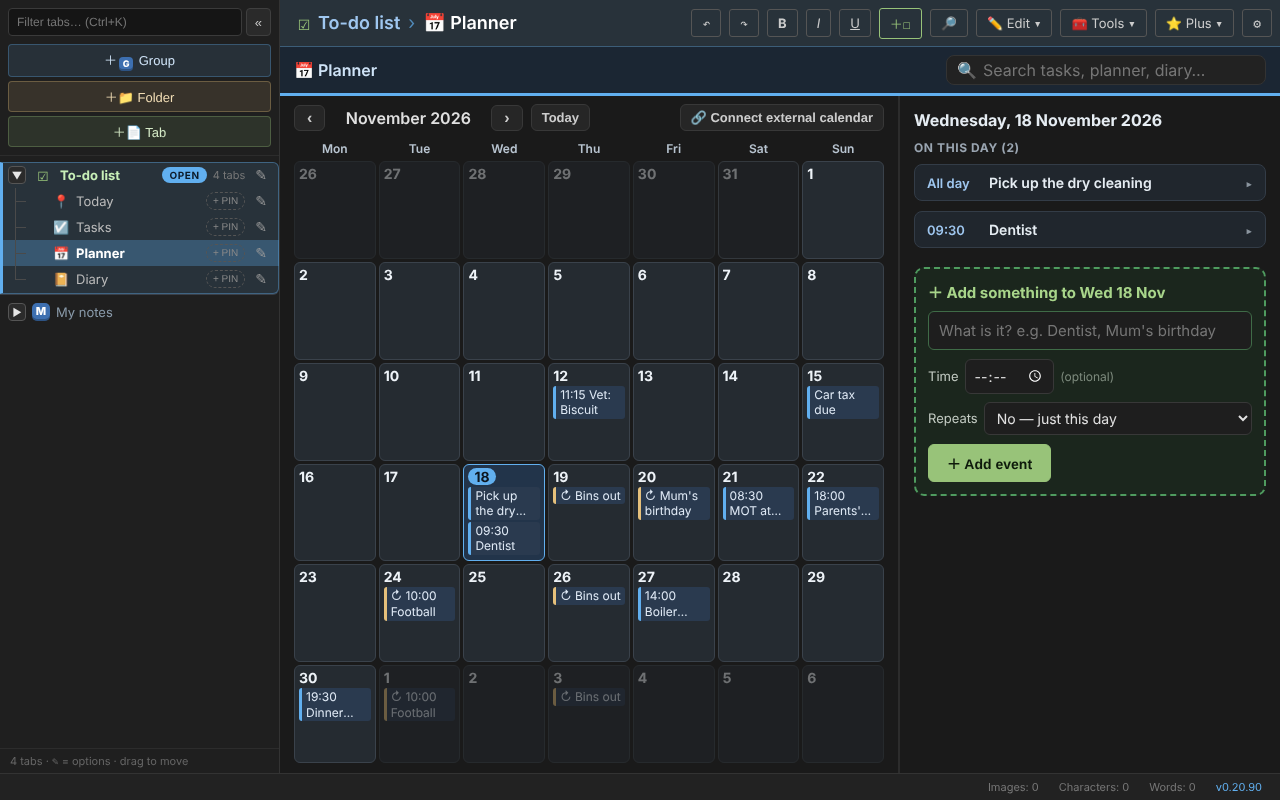
Add an event
- Open To-do list, then Planner, and tap a day.
- Type what it is, add a time if you want one, and choose whether it repeats every week, month or year.
- Press Add event. Drag an event to another day to move it.
See your Google Calendar in the Planner
- In Google Calendar on a computer, press the cog and choose Settings.
- Under "Settings for my calendars", click your calendar, then scroll to Integrate calendar.
- Copy Secret address in iCal format.
- In the Planner press Connect external calendar, paste the address and press Add this calendar.
What to expect
- Events from your other calendar show in purple with a lock. You can read them in BaldyNotes but change them only in that calendar.
- They are refreshed every 30 minutes.
- Apple and Outlook calendars work the same way, with their own calendar address.
Your Planner in Google or Apple Calendar
With BaldyNotes Plus you can do the opposite too: switch on a private address for your Planner and add it to Google or Apple Calendar, so your Planner events show there. Google checks for changes every several hours.
Get reminders for your Planner events
- Google Calendar: open its Settings, click the BaldyNotes calendar in the left column and add the reminders you want under "Event notifications" and "All-day event notifications". Google then reminds you about every BaldyNotes event.
- Apple Calendar: in BaldyNotes, tick the reminders you want under "Reminders for Apple Calendar" in Connect external calendar. Then switch off "Remove Alarms" (iPhone) or untick "Remove Alerts" (Mac) for the BaldyNotes calendar, so Apple keeps them.
Try BaldyNotes
Free on one device, with no account needed. Your notes are encrypted on your own device.