A private to-do list in your browser
BaldyNotes has a to-do list built in. It is encrypted on your own device like the rest of your notes, and it is free.
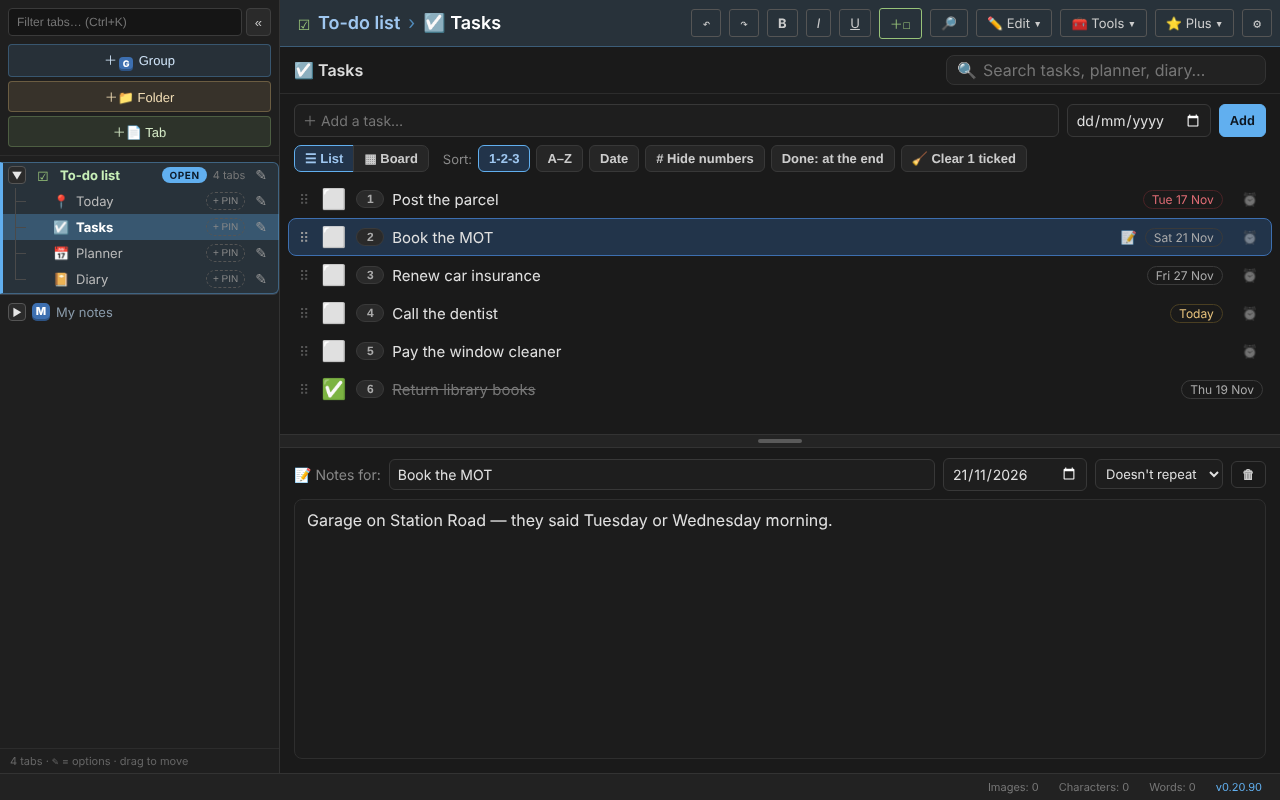
Add your tasks
- Open BaldyNotes and choose To-do list, then Tasks.
- Type a task in the box at the top. Add a due date if it has one, and press Add.
- Tick a task when it is done. Tap a task to write notes for it underneath.
Tasks that come round again
Tap a task and set it to repeat every day, week, month or year. When you tick it, it comes back with its next date, so the bins, the rent and birthdays never need typing twice.
See it as a board
Press Board to see the same tasks in columns: To do, Doing and Done. Drag a card to another column, or tap a card and use its "Move to" buttons. Drop a card onto another to set your own order. Press Columns to rename the columns or add your own, such as "Waiting". Press List to go back. Both views always show the same tasks.
The Today page
The Today tab shows what is overdue, today's tasks and events, and the next 7 days, on one page.
Good to know
- Sort by number, name or date, and drag tasks into your own order.
- Print the list, or save it as a PDF, from the Tools menu.
- With BaldyNotes Plus you can sync the list between your devices and set reminders that arrive on your phone.
Try BaldyNotes
Free on one device, with no account needed. Your notes are encrypted on your own device.
More guides
- Take notes beside any web page
- How BaldyNotes keeps your notes private
- Sync notes between your phone and computer
- A planner that shows your Google or Apple calendar
- Sketch and draw in your browser
- Send a note or a file privately to someone
- A free, private expense tracker
- Keep track of returns and warranties