A free, private expense tracker
The Expenses tab in BaldyNotes is a simple place to note what you spend. It is free, it is locked on your own device like your notes, and it never asks for your bank details.
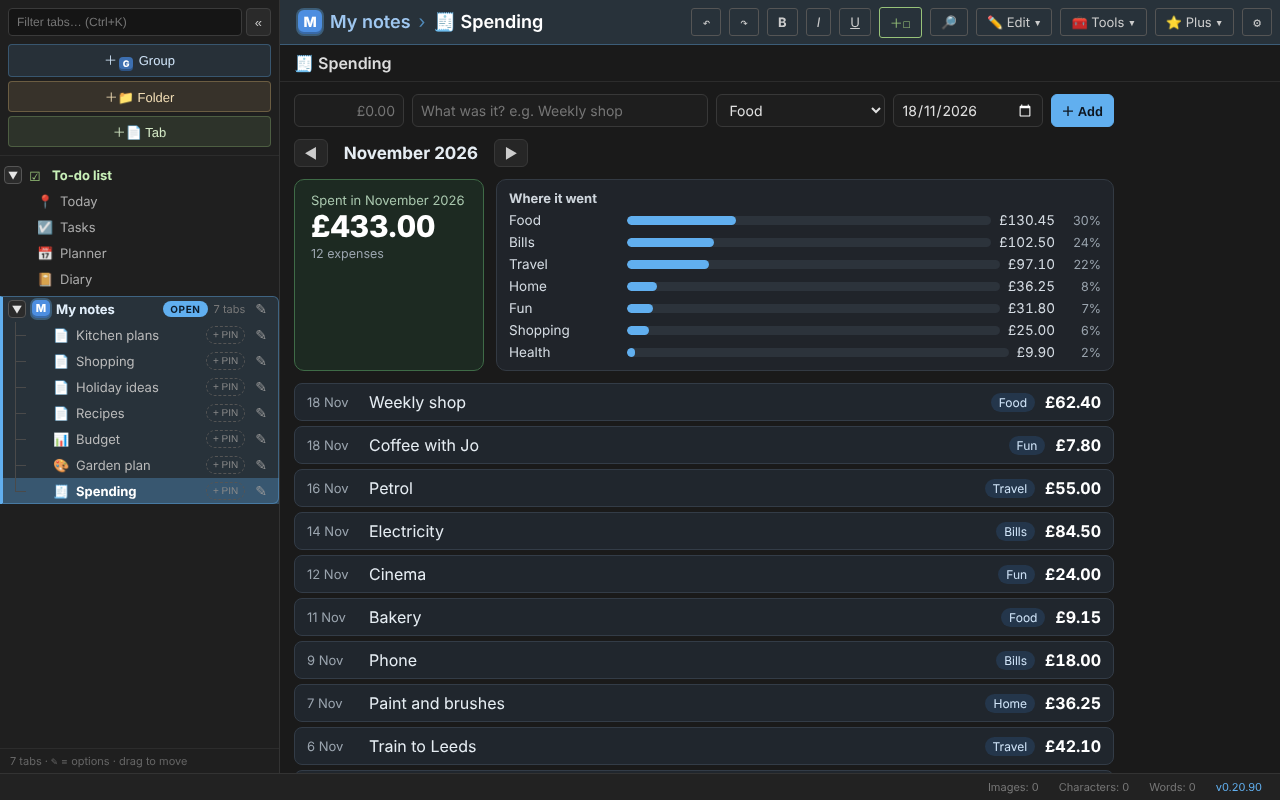
Make an Expenses tab
- Press + Tab and choose Expenses.
- Type the amount and what it was, pick a category and press Add. The date starts as today.
See where the money went
The tab shows one month at a time: the total you spent, and a "Where it went" list with each category's total and share. Use the arrows to look at earlier months.
Change an expense, or add the receipt
Tap an expense to change its amount, name, category or date, or to delete it. Press Add a photo of the receipt to keep a picture with it. The photo is kept on your device, like the pictures in your notes.
Make it yours
- Categories lets you rename the categories, add your own and choose the money sign.
- Copy this month to a spreadsheet makes a spreadsheet tab with a total, to do more with the numbers.
- Print the month, or save it as a PDF, from the Tools menu.
Good to know
- There is no bank linking: you type what you spend, and nobody else sees it.
- With BaldyNotes Plus your expenses sync between your devices, encrypted, like the rest of your notes.
Try BaldyNotes
Free on one device, with no account needed. Your notes are encrypted on your own device.
More guides
- Take notes beside any web page
- A private to-do list in your browser
- How BaldyNotes keeps your notes private
- Sync notes between your phone and computer
- A planner that shows your Google or Apple calendar
- Sketch and draw in your browser
- Send a note or a file privately to someone
- Keep track of returns and warranties